クリスマスが近づくと、街にはイルミネーションが輝き、クリスマスツリーやサンタクロースなど、季節を感じさせる飾り付けが増えていきます。そんなクリスマスならではの雰囲気を、好きなキャラクターのイラストにも取り入れてみたいと思いませんか?
今回紹介するのは、好きなキャラクターの画像を参考にして、クリスマスをテーマにした可愛らしい着ぐるみ姿に変身させる画像生成AI用プロンプトです。
このプロンプトの特徴は、単にキャラクターにクリスマス衣装を着せるだけではないことです。クリスマスツリー、サンタクロース、トナカイ、雪だるま、プレゼントなど、複数のモチーフから着ぐるみをランダムに選び、キャラクターの個性を残したまま、季節感のあるイラストに仕上げます。
さらに、表情や背景のシチュエーションもランダムに決定されるため、生成するたびに異なるクリスマスのワンシーンを楽しめます。
今回は、このプロンプトの使い方や特徴、生成されるイラストの魅力について紹介します。
今回使用するプロンプト
以下が今回使用する画像生成AI用のプロンプトです。
添付画像をキャラクターの参考画像として使用し、顔立ち、髪型、髪色、瞳の色、年齢の印象、特徴的な部分、全体的な個性を維持するように指示しています。
また、キャラクターを可愛らしいデフォルメ体型に変換しながらも、元のキャラクターだと分かるようにすることが重要なポイントです。
プロンプトでは、Pythonのランダム抽選を実行してから画像を生成するように指定しています。着ぐるみの種類だけでなく、表情、シチュエーション、レア演出、隠し要素まで抽選によって決定されます。
Use the attached image as the character reference. Preserve the character’s face, hairstyle, hair color, eye colors, age impression, distinctive features, and overall identity. Translate their body type into cute chibi proportions while keeping them recognizable. Do not copy the original pose, outfit, or background.
Create one high-quality 2D anime illustration of this character wearing a randomly selected Christmas kigurumi. Randomize the costume, expression, situation, and occasional special effect using the Python lottery below.
Before generating the image, actually run Python. Do not fake the randomization in text, choose results manually, or reroll based on preference. Run this lottery once per illustration and use its results consistently.
import random
christmas_items = [
“ChristmasTree”,
“SantaClaus”,
“Reindeer”,
“Snowman”,
“ChristmasPresent”,
“Gingerbread”,
“ChristmasStocking”
]
weights = [70, 5, 5, 5, 5, 5, 5]
selected = random.sample(christmas_items, counts=weights, k=1)[0]
japanese_map = {
“ChristmasTree”: “クリスマスツリー”,
“SantaClaus”: “サンタクロース”,
“Reindeer”: “トナカイ”,
“Snowman”: “雪だるま”,
“ChristmasPresent”: “プレゼント”,
“Gingerbread”: “ジンジャーブレッド”,
“ChristmasStocking”: “クリスマスの靴下”
}
selected_japanese = japanese_map[selected]
moods = [
“Joyful”,
“Shy”,
“Sleepy”,
“Surprised”,
“Gentle”,
“Playful”,
“Proud”
]
selected_mood = random.sample(moods, k=1)[0]
situations = [
“SnowyTown”,
“FireplaceBreak”,
“ChristmasMarket”,
“ForestDecorating”,
“WindowWatching”,
“SnowShoveling”
]
selected_situation = random.sample(situations, k=1)[0]
rarities = [“Normal”, “Special”]
selected_rarity = random.sample(rarities, counts=[95, 5], k=1)[0]
special_effects = [“GoldenDecorations”, “Aurora”]
selected_effect = random.sample(special_effects, k=1)[0] if selected_rarity == “Special” else None
hidden_details = [“TinyStarStitch”, “TinyHeartStitch”]
selected_hidden_detail = random.sample(hidden_details, k=1)[0]
print({
“costume”: selected,
“japanese_text”: selected_japanese,
“mood”: selected_mood,
“situation”: selected_situation,
“rarity”: selected_rarity,
“special_effect”: selected_effect,
“hidden_detail”: selected_hidden_detail
})
Use only the selected costume description:
ChristmasTree: A rounded evergreen tree kigurumi with softly tiered branches, small colorful baubles, subtle warm lights, and a soft golden star at the top.
SantaClaus: A plush Santa mascot kigurumi with a rounded red body, fluffy white trim, a black belt detail, and a soft Santa hat. Do not cover the character’s face with a beard.
Reindeer: A warm-brown reindeer kigurumi with rounded antlers, floppy costume ears, a cream belly, and a small festive collar.
Snowman: A fluffy white snowman kigurumi with a softly rounded snowball silhouette, decorative buttons, a cozy scarf, and a small hat. Keep snowman decorations away from the character’s face.
ChristmasPresent: A cushioned gift-box kigurumi with rounded corners, pastel wrapping, a wide ribbon, and a large soft bow.
Gingerbread: A biscuit-brown gingerbread kigurumi with rounded limbs, white icing trim, and small candy-like decorative buttons.
ChristmasStocking: A plush red Christmas stocking kigurumi with a fluffy white cuff, a softly curved stocking silhouette, and delicate festive embroidery.
Every costume must look soft, rounded, comfortable, and plush, with integrated arms and feet. The character’s face must be clearly visible through the costume opening. Keep enough hair visible to preserve their identity. Costume decorations must not create a second visible face or an additional character.
Use only the selected mood direction:
Joyful: A delighted smile with bright eyes and a lightly buoyant posture. When the activity allows it, bring the plush-covered hands together near the chest.
Shy: A small bashful smile, subtle blush, and a slightly averted gaze. Use a modest posture, gently holding a prop close or touching the edge of the costume opening.
Sleepy: Soft half-lidded eyes, a tiny relaxed mouth, lowered shoulders, and slow, cozy gestures.
Surprised: Gently widened eyes and a small round mouth. Pause the activity briefly, reacting to a snowflake, a drifting ribbon, or a small unexpected detail.
Gentle: A quiet, warm smile with relaxed eyes and careful, tender movements.
Playful: A mischievous little grin, a slight head tilt, and a lively but small gesture. A soft wink is allowed if it suits the reference character.
Proud: A cute smug, self-satisfied smile and a confident stance. Use hands on hips only when the selected activity leaves both hands free.
Keep the selected expression natural to the reference character’s personality. Adjust its intensity rather than replacing their recognizable face with a generic mascot face. Keep blush subtle.
Use only the selected situation:
SnowyTown: On a snowy rise overlooking warmly lit Christmas streets and rooftops. The character has paused while carrying one small wrapped gift. A little snow rests on the costume.
FireplaceBreak: In a cozy room beside a softly glowing fireplace, resting with one warm mug. Show soft cushions, warm light, and a few restrained Christmas decorations.
ChristmasMarket: Beside a small festive market stall, holding one little paper bag. Show glowing lights, snowy wooden stalls, and a spacious winter sky. Keep the market free of other people.
ForestDecorating: In a quiet snowy evergreen grove, carefully attaching one small ornament to a low branch. The costume may have a little snow on its shoulders.
WindowWatching: Beside a large window, watching snow drift outside while holding a warm mug or resting one hand on the sill. Show a softly lit room and distant Christmas lights.
SnowShoveling: Outside a cozy decorated house, clearing a small path with a short snow shovel. Make the effort charming and gentle. A little powder snow has gathered around the costume’s feet.
The selected situation determines the main activity, props, and setting. The selected mood determines the expression, gaze, posture, and way the character performs that activity.
Combine them into one coherent moment. Adapt suggested gestures to the activity; never add extra hands, duplicate props, or contradictory actions. Use no more than two handheld props.
If selected_rarity is Normal, use ordinary soft Christmas lighting and the standard costume palette.
If selected_effect is GoldenDecorations, add a few delicate pale-gold accents to the selected costume and subtle golden light reflections. Keep the original costume motif immediately recognizable.
If selected_effect is Aurora, show a soft pastel aurora in the outdoor sky. For an indoor situation, show it through a window. Keep the aurora gentle and secondary to the character.
Do not display rarity labels, badges, odds, or special-effect names.
Add one discreet hidden detail according to selected_hidden_detail: either a tiny embroidered star or a tiny embroidered heart on a costume seam. Make it discoverable on closer inspection without drawing attention away from the character.
Use delicate linework, low-saturation pastel colors, soft cel shading, and subtle watercolor-like edges. Keep the image clearly 2D anime, airy, cozy, and dreamy. Avoid photorealism, glossy 3D rendering, and heavy contrast.
Use a slightly low-angle composition, adjusted naturally for standing or sitting. Show enough of the costume to recognize its silhouette and enough of the environment to understand the activity. Leave clear negative space for the lettering.
Allow natural variation in framing, light, wind, snow, and small fabric movements. Keep the character’s identity fixed. Aim for a charming little Christmas story rather than a repeated costume display pose.
Add large bold Japanese sumi-ink brush lettering showing only the exact value of selected_japanese. Copy the spelling from japanese_map exactly, including kanji, hiragana, and katakana. The lettering and costume must match.
Place the lettering in open space without covering the character’s face, hands, or main action. Integrate its placement with the composition while keeping it legible.
Do not add any extra text, English words, greetings, logos, signatures, watermarks, or explanations inside the illustration. Do not display the mood, situation, rarity, or lottery results.
Single character only. Single selected costume motif only. Single coherent scene only. Single illustration only. No additional people, animals, or mascots. No collage, panels, thumbnails, or alternate versions.
なお、実在する人物や既存のキャラクターの画像を参考にして画像を生成する場合は、著作権や肖像権などの権利に十分配慮しましょう。また、使用する画像生成AIサービスの利用規約も事前に確認することが大切です。
特に、生成した画像をブログやSNSで公開する場合や、商用利用を予定している場合は、元画像の権利関係や利用条件を確認し、必要に応じて権利者の許可を得るようにしてください。
安心して画像生成を楽しむためにも、第三者の権利を尊重し、適切な範囲で活用しましょう。
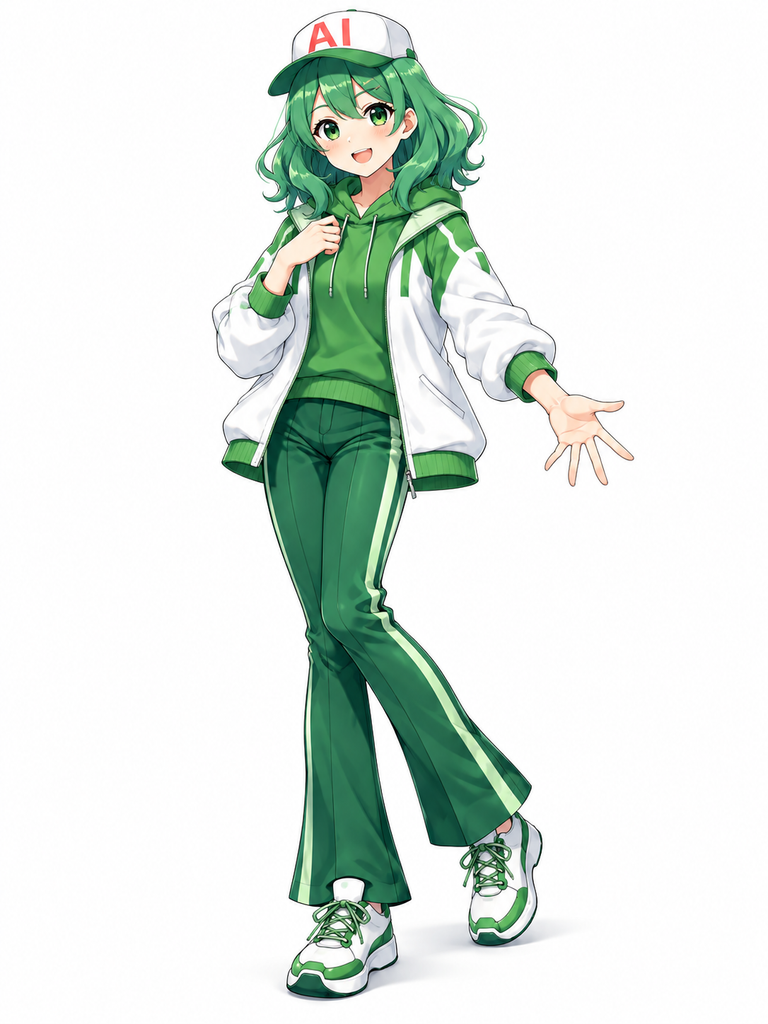
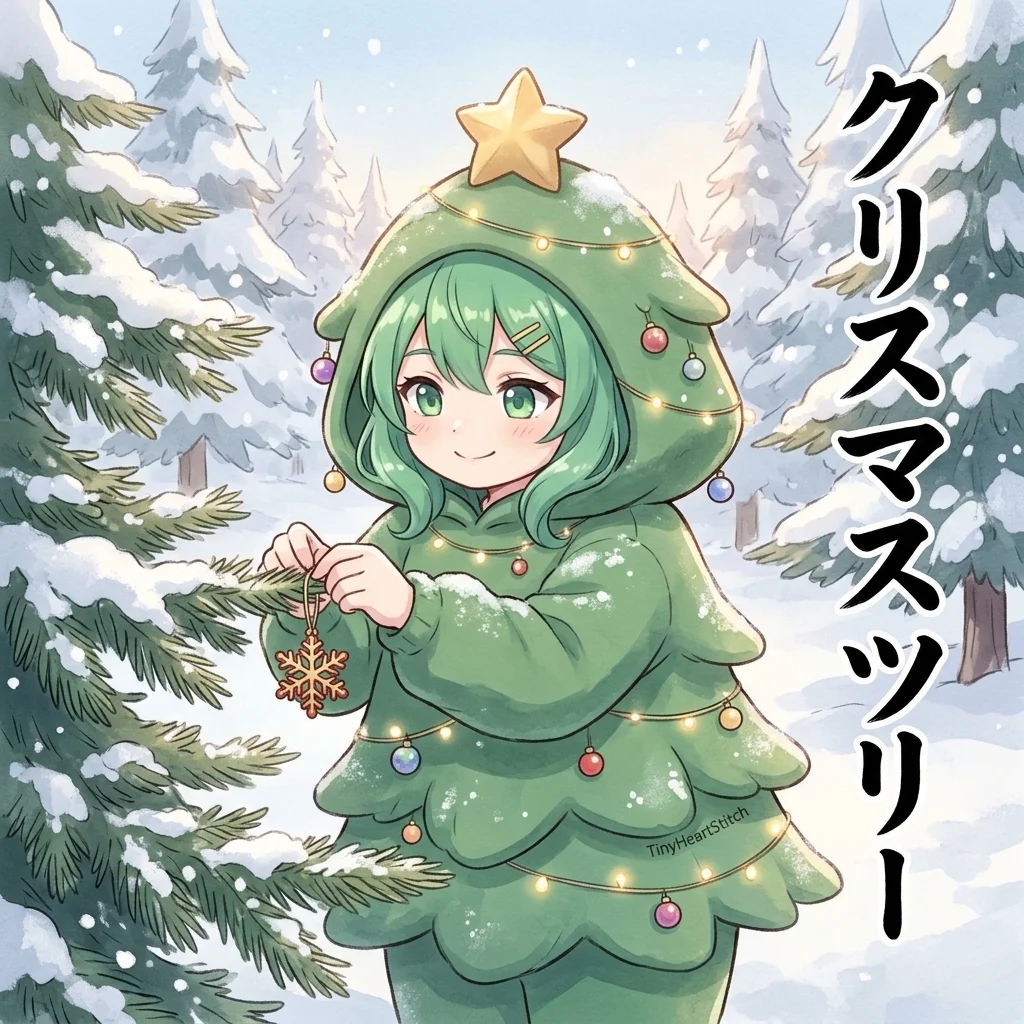
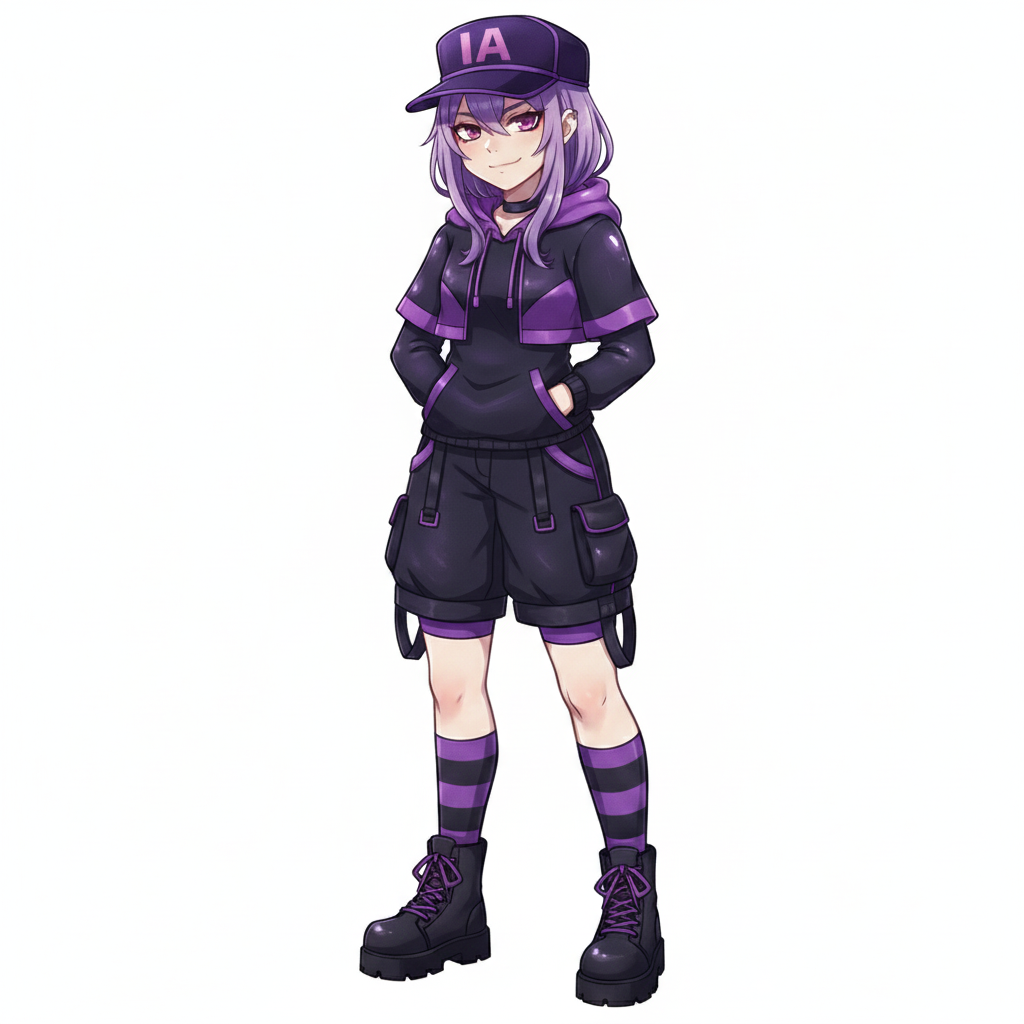
左が元となった画像、
右が変換後の画像だよ。
クリスマスツリーの、
着ぐるみを着ているね。
とっても可愛いなも。
マスコットとして、とてもアリなも。
7種類のクリスマス着ぐるみをランダムに抽選
今回のプロンプトでは、7種類のクリスマスモチーフから着ぐるみが選ばれます。
特に注目したいのが、クリスマスツリーの出現確率が70%に設定されている点です。それ以外の6種類は、それぞれ5%の確率で選ばれます。
そのため、クリスマスツリーの着ぐるみが比較的多く登場する一方で、ときどき珍しいモチーフに出会える楽しみがあります。
それぞれの着ぐるみには、専用のデザイン指定があります。
クリスマスツリーは、丸みのある枝を重ねたシルエットにカラフルなオーナメントや温かなライトを配置し、頭頂部には小さな金色の星を付けます。
サンタクロースは、赤いふっくらしたボディに白いファーとベルトを組み合わせたデザインです。顔がひげで隠れないように配慮されています。
トナカイは、丸みのある角と垂れた耳、クリーム色のお腹が特徴です。
雪だるまは、白くふわふわした雪玉のようなシルエットに、ボタンやマフラーを組み合わせます。
プレゼントは、パステルカラーの包装紙と大きなリボンが印象的な着ぐるみです。
ジンジャーブレッドは、ビスケットのような茶色のボディに白いアイシング模様を施したデザインです。
クリスマスの靴下は、赤い本体に白いふわふわの履き口と繊細な刺繍を加えます。
どの着ぐるみも、柔らかく丸みのあるぬいぐるみのような仕上がりになるように指定されています。
表情とシチュエーションもランダムに変化
着ぐるみだけでなく、キャラクターの表情も7種類からランダムに選択されます。
喜び、恥ずかしさ、眠そうな表情、驚き、優しさ、いたずらっぽさ、そして得意げな表情です。
例えば、喜びが選ばれた場合は、目を輝かせた嬉しそうな笑顔になります。恥ずかしさなら、ほんのり頬を赤らめながら、少し視線をそらした控えめな表情になります。
眠そうな表情では、半分閉じた目とリラックスした姿勢によって、冬の穏やかな雰囲気を演出します。
さらに、背景となるシチュエーションも6種類から抽選されます。
雪が積もった街並みを眺める場面、暖炉のそばで温かい飲み物を楽しむ場面、クリスマスマーケットに立ち寄る場面など、さまざまな状況が用意されています。
ほかにも、雪の積もった森でオーナメントを飾る場面や、窓辺で雪を眺める場面、家の前で雪かきをする場面などがあります。
ここで重要なのは、表情とシチュエーションが別々に抽選されるだけではなく、自然につながるように指示されていることです。
例えば、雪かきをしているキャラクターが眠そうな表情をしていたり、窓辺で雪を眺めながら優しく微笑んでいたりと、組み合わせによってさまざまな物語が生まれます。
5%の確率で登場する特別な演出
今回のプロンプトには、ちょっとしたお楽しみ要素としてレア演出も用意されています。
通常の画像が95%、特別な演出が5%の確率で選ばれる仕組みです。
特別な演出に当選すると、さらに2種類の効果からランダムでひとつが選択されます。
ひとつ目は、ゴールドの装飾です。着ぐるみに淡い金色のアクセントを追加し、周囲にもさりげない金色の光を反射させます。
ふたつ目は、オーロラです。屋外なら冬空に柔らかなパステルカラーのオーロラを描き、室内なら窓の向こうにオーロラを配置します。
どちらもキャラクターを主役にしたまま、特別感のあるクリスマスイラストに仕上げるための演出です。
また、もうひとつの隠し要素として、小さな星またはハートの刺繍がランダムで追加されます。
こちらは着ぐるみの縫い目などに控えめに配置されるため、拡大して初めて気付くような遊び心があります。
こうした小さな仕掛けがあることで、完成した画像をじっくり眺める楽しみも生まれます。
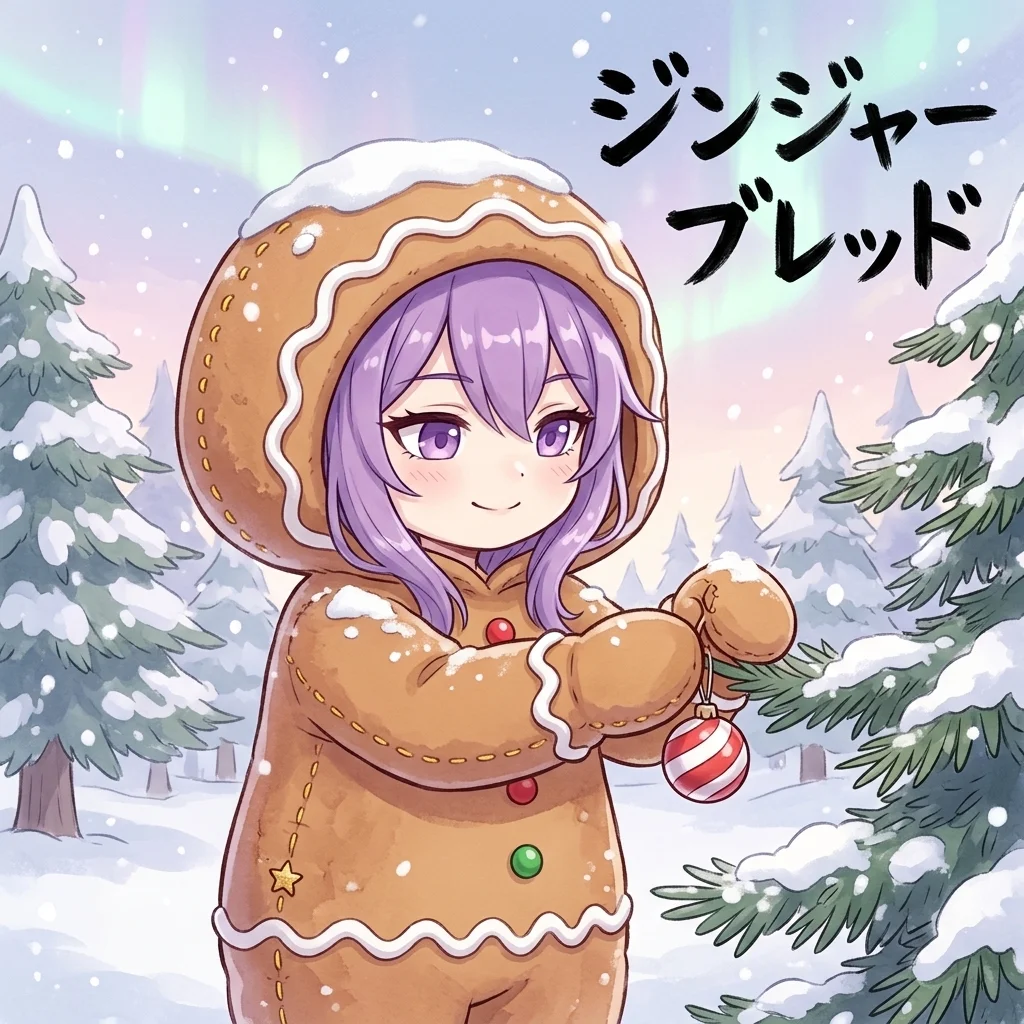
キャラクターの個性を残したデフォルメ表現
今回のプロンプトで特に大切にしているのが、元画像のキャラクターらしさを維持することです。
クリスマスの着ぐるみを着せる際に、キャラクターの顔や髪型まで大きく変わってしまうと、元のキャラクターとは別人のように見えてしまうことがあります。
そこで、顔立ち、髪型、髪色、瞳の色、特徴的な装飾などを維持するように指定しています。
一方で、体型については可愛らしいデフォルメ表現に変換します。
頭身を低くしたチビキャラ風のデザインにすることで、大きく丸みのある着ぐるみとの相性も良くなります。
また、着ぐるみの顔の部分からキャラクター本人の顔がはっきり見えるようにし、髪もある程度外に出すように指定しています。
着ぐるみの装飾によって別の顔が生まれたり、余計なキャラクターが追加されたりすることも防いでいます。
さらに、元画像のポーズや衣装、背景をそのままコピーしないように指示しているため、クリスマスの世界観に合わせた新しいイラストを楽しめます。
クリスマスの雰囲気を演出するイラスト表現
イラスト全体の画風には、繊細な線画、彩度を抑えたパステルカラー、柔らかなセル塗り、水彩画のような控えめな輪郭表現を指定しています。
これによって、ふんわりとした温かみのある2Dアニメイラストを目指します。
また、構図は少しローアングルを基本とし、立っている場合も座っている場合も自然に見えるように調整します。
着ぐるみの全体的なシルエットが分かることに加えて、背景からも状況が伝わるようにすることがポイントです。
例えば、クリスマスツリーの着ぐるみなら、雪の降る街並みを背景にした姿が似合いますし、雪だるまの着ぐるみなら、暖かな室内でくつろいでいる場面も魅力的です。
さらに、画像内には抽選された着ぐるみの名前を日本語の筆文字で大きく表示するようにしています。
「クリスマスツリー」「サンタクロース」「トナカイ」など、選ばれたモチーフと一致する文字だけを表示し、それ以外の文字やロゴ、透かしなどは追加しないように指定しています。
文字がキャラクターの顔や手、メインの動作を隠さないように余白へ配置することも重要です。
実際に試すときのポイント
このプロンプトを使用する際は、まず変身させたいキャラクターの画像を用意します。
顔や髪型、衣装の特徴が分かりやすい画像を使用すると、元のキャラクターらしさを維持しやすくなります。
次に、画像生成AIにキャラクター画像を添付し、プロンプトを入力します。
今回のプロンプトでは、Pythonによる抽選を実際に実行することが前提になっています。そのため、Pythonコードを実行できる環境や機能を備えた画像生成AIを使用する必要があります。
Pythonを実行できない環境では、抽選部分を正確に再現できない可能性があります。また、画像生成AIによっては、文字の描画や細かな衣装の指定が完全には反映されないこともあります。
特に日本語の筆文字については、指定した文字と異なる表記になったり、文字の形が崩れたりする場合があります。必要に応じて画像編集ソフトなどで修正するとよいでしょう。
また、同じキャラクターで何度か生成してみるのもおすすめです。抽選によって着ぐるみや表情、背景が変わるため、毎回違ったクリスマスの姿を楽しめます。
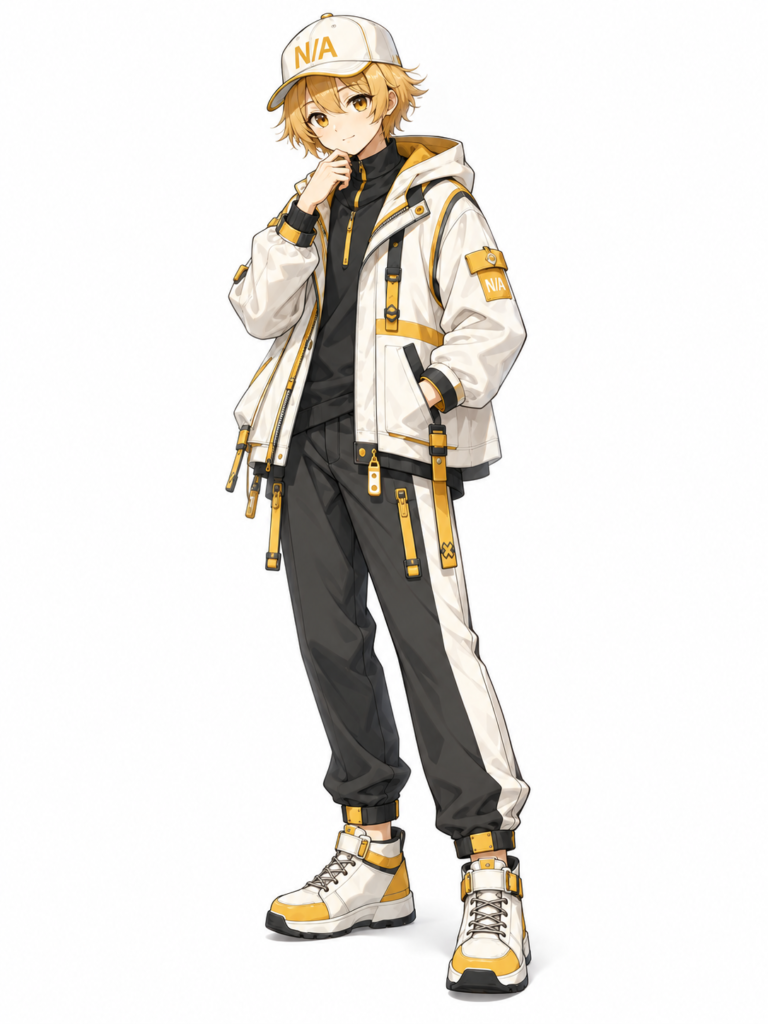
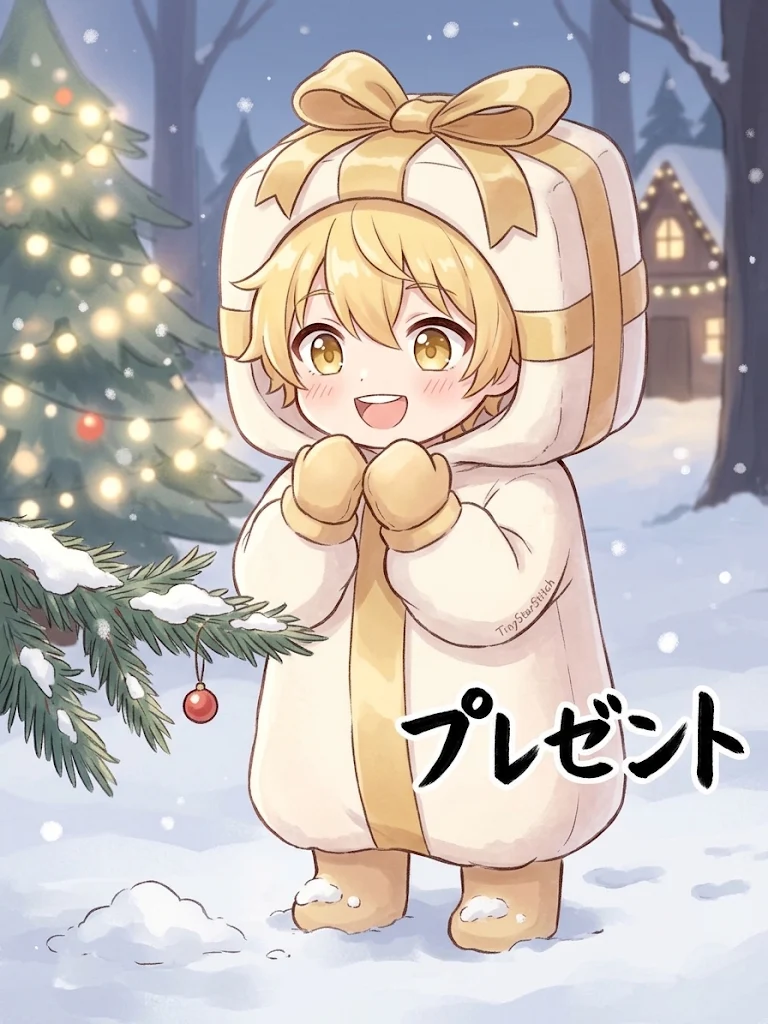
まとめ
いかがでしょうか?今回は、好きなキャラクターにクリスマスの着ぐるみを着せるプロンプトを、紹介しました。このプロンプトでは、変身させたいキャラクターの画像を用意し、画像生成AIにキャラクター画像を添付して、プロンプトを入力することで、可愛らしいクリスマスの着ぐるみを着た一枚を生成することができます。皆様もぜひ、このプロンプトを使って、冬にぴったりの可愛らしい一枚を作ってみてはいかがでしょうか?
引用元:https://x.com/A2Ga4/status/2108135160575324540?a=ClSPVXsRbWaSi-sCESU&s=20
あわせて読みたい
こちらの記事では
オリキャラが
グルメ番組に
出演するプロンプト
を紹介しているなも。