皆さん、こんにちは!SNSには日夜、様々なネットミームが流れています。
今回はその中でも特に異彩を放つネットミーム、「河野太郎チャレンジ」をご紹介致します!
AIが初めての方でもマネできるよう、やり方やプロンプトも交えてご紹介するので是非最後までお付き合いください!
河野太郎氏の公式サイトはこちらからhttps://www.taro.org/
河野太郎氏のネットミームって何?
まず前提として、「河野太郎チャレンジ」をご説明します。
これは簡単に言うと、
本人に見つからないように「河野太郎」をひねって表現する遊びです。
縦読み・暗号・画像化など、みんな工夫するのに、なぜか本人が見つけて反応してしまう…という“謎の対決”が話題になり、ネットニュースとして取り上げられる程にhttps://nlab.itmedia.co.jp/cont/articles/3296400/#google_vignette
しかも後年になっても同氏のエゴサ力は進化し続けており、ネットユーザーを驚かせています。
ど、どうやってリサーチしてるなも!?
真相は、河野太郎氏本人のみが知るなも…
今回はこのネットミームにAIを使って挑戦してみようと思います!
使用するAIはGeminiのNano Banana 2
今回はGoogle GeminiのNano Banana 2というAIを使用します!
Geminiはこちらからhttps://gemini.google.com/app?hl=ja
使い方も合わせてご紹介していきます。スクリーンショットを見ながら是非やってみてください!
僕たちと一緒に、やってみるなも!
1 まずはGeminiを開く
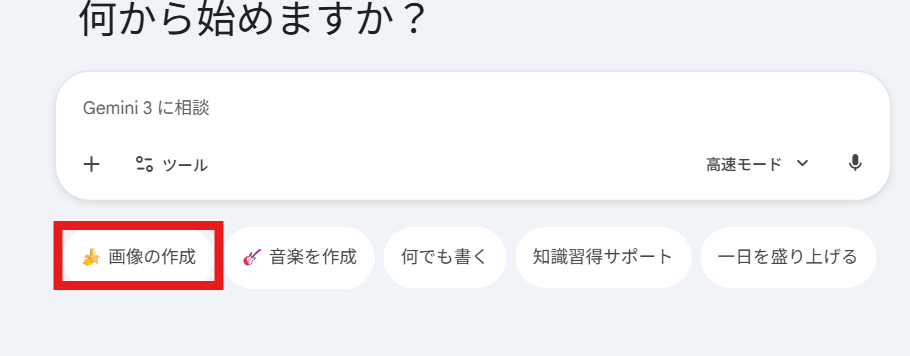
最初にGeminiを開くと、このようなホーム画面が表示されます。
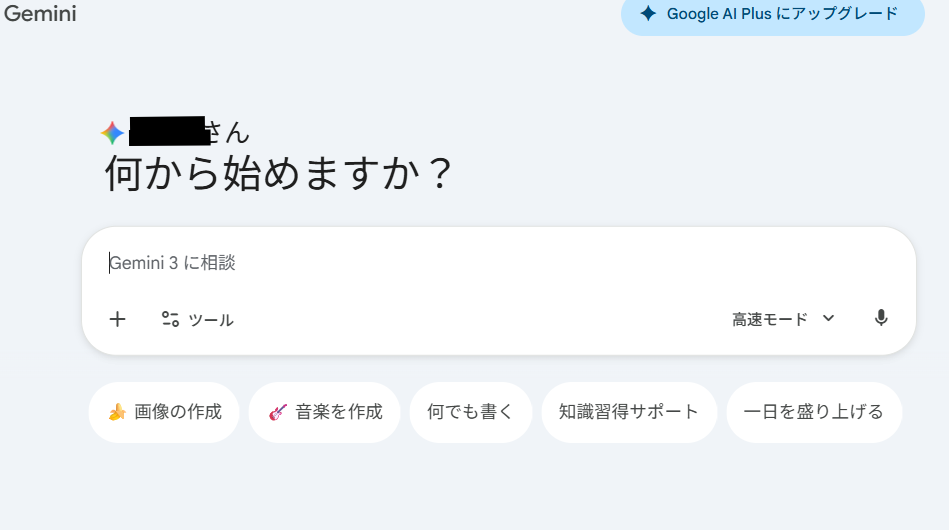
画面の下にある入力欄が、これから指示文を入れる場所です。
ここから画像生成に進めます。
この時点では、まだNano banana 2は始まっていません。
まずは画像を作るモードに切り替えてみましょう。
まずはGeminiを開くなも!https://gemini.google.com/app?hl=ja
2 「画像を作成」を押して画像生成モードに入る
次に、入力欄まわりにある「画像を作成」をクリックします。(赤枠で囲った部分)
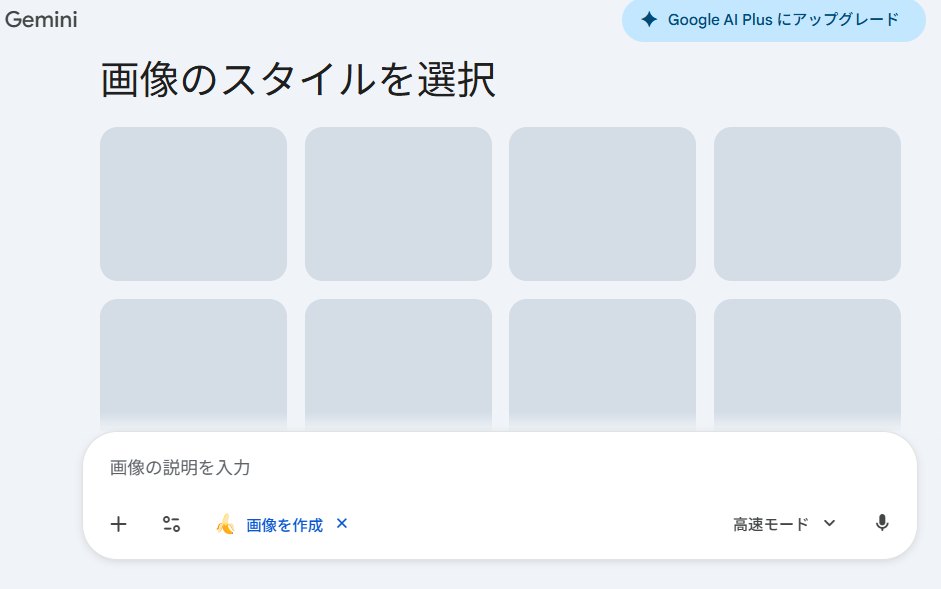
すると、画像生成用の画面に切り替わります。
見るべきなのは下の入力欄。
ここに作りたい画像の内容を書いていけば、Nano banana 2を使った生成に進めます。

上の方に「画像のスタイルを選択」と出てるけど、ここは無視して大丈夫なも!次の工程に進むなも!
3 右下の「モード選択ボタン」でAIの賢さを選ぶ
画像を作る前に、もうひとつ見ておきたいのが右下のモード選択です。
スクショでは「高速モード」と表示されている部分ですね。
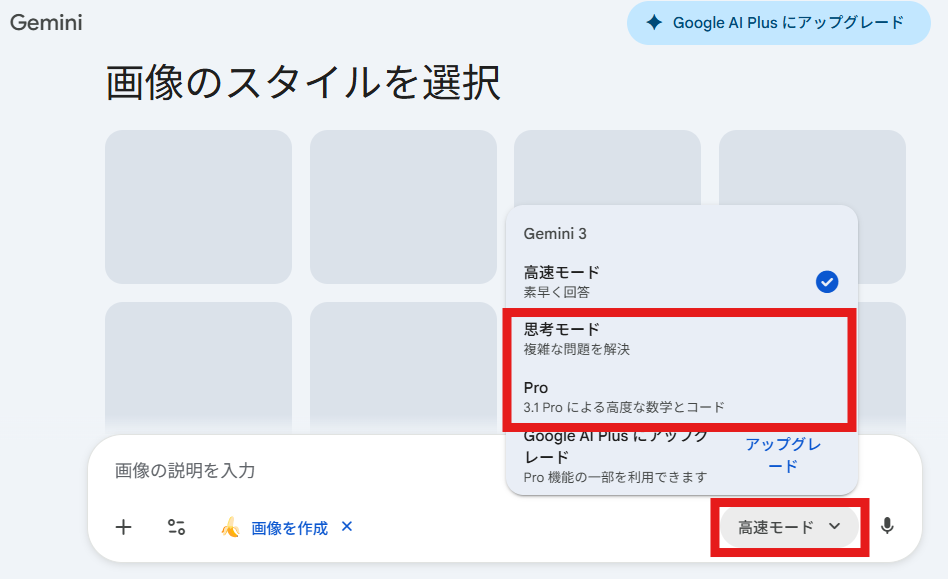
ここをクリックすると、AIの賢さを選べます。
おすすめしたいのは「思考モード」か「Proモード」のどちらかです。
「高速モード」は返答が早いぶん、細かい指示の反映や決めたルール通りに動けない事があります。
一方で「思考モード」は、指示を少し丁寧に読み取ってくれやすく、イメージを整えたいときに使いやすいです。
さらに「Proモード」は、よりしっかり考えながら生成したいときに向いています。ここぞというときに、頼りましょう!
とくに今回のように、
「左に人物、右に大きな文字」
「眼鏡を入れる」
「文字は参戦!!だけ」
のように細かく条件をそろえたい場合は、高速モードよりも思考モードかProモードの方が安定しやすいです。
ここで注意点なも!
「思考モード」と「Proモード」は便利だけど、一日に使える回数に上限があるなも。無料ユーザーは毎日の上限が変動して、その日の需要によって上限が変わるなも。
また、これとは別にNano Banana 2の方も上限があり、こちらは1日20枚までなも。そこそこの枚数が生成できるから、こっちは気にし過ぎ無くても大丈夫なはずなも!
上限の詳細は、Geminiヘルプ公式サイトをご確認ください。https://support.google.com/gemini/answer/16275805?hl=ja-JP
コピペ用プロンプト 河野太郎 参戦!!
お待たせ致しました!いよいよ画像の生成です!今回はそのままコピペして使えるプロンプトをご用意しました!下記からコピペしてご利用ください。
コピペの原型はXユーザー、てんねん様からお借りしました。この場をお借りして感謝申し上げます。
※そのまま貼って使えます。
※「写真をそのまま再現」ではなく、それっぽい雰囲気のオリジナルイラストとして出す指示にしています。
layering:
  order:
    - text_layer
    - character_layer
    - background_layer
  strict: true

subject:
  description: >
    Create a Japanese male politician-like character inspired by Taro Kono's public vibe,
    but do NOT replicate an exact real-person likeness or photo identity.
    Keep it as an original illustration: recognizable "energy" only.
  identity_rules: >
    Avoid photorealistic accuracy. No exact facial replication. No direct cloning.
  key_traits_lock:
    - "middle-aged Japanese man"
    - "short neat dark hair"
    - "clean suit + tie (politician press look)"
    - "confident, bold expression (heroic announcement vibe)"
    - "distinctive strong eyebrows + sharp gaze"
  framing: >
    Bust-up composition (head to upper torso), large and prominent.
  detail_level: ultra_high_resolution
  micro_details: emphasize_hair_edges_fabric_details_clean_line_fidelity

composition:
  aspect_ratio: "16:9"
  layout: >
    Character positioned on one side; headline text on the opposite side.
  emphasis: >
    Strong presence on the character's upper body and expression.
  negative_space: >
    Reserve clean space for big Japanese text. No clutter behind text.

action:
  description: >
    Minimal motion enhancement. Add subtle dramatic energy (wind, cloth tension, sparks),
    but keep pose stable and readable.

location:
  description: >
    Simple abstract background. Soft gradients, atmospheric glow, light particles,
    abstract rays. Avoid complex textures. Avoid any copyrighted shapes or game UI motifs.
  background_feel: >
    Subtle, atmospheric, clean.

style:
  visual_style: >
    High-impact reveal-splash poster aesthetic with strong contrast between character and headline.
    NOT a direct copy of any specific game's UI/logo/layout.
  text_effects: >
    Metallic, high-energy lettering with pronounced depth and perspective. No glow effects on metallic text.
  character_rendering: >
    Extremely high-resolution illustration rendering with crisp edges and clean texture fidelity.
    (Illustration-like, not photoreal.)
  background_style_rules: >
    Background must be purely non-figurative. No silhouettes, no blurred shapes,
    and no reused subject elements.
  ink_splash_rules: >
    Ink splash must be pure black only. No other colors, tinting, blending, or variation.
  copyright_safety_rules: >
    No Nintendo / Smash / official logos. No exact UI copy. No trademarked typography imitation.

camera_lighting:
  camera_angle: dynamic_three_quarter_or_front
  lighting: >
    Dramatic key lighting and subtle rim highlights to emphasize the reveal.
  clarity: maximum_definition

colors:
  palette: >
    Background colors: deep navy / dark teal / charcoal gradient with subtle particles.
    Character name in metallic silver; announcement text in saturated yellow.
  mood: dramatic, heroic, high_energy

text:
  character_name: "河野太郎"
  announcement_fixed: "参戦!!"
  placement: opposite_side_of_character
  perspective: >
    Pronounced perspective: front surface larger, back tapered with visible extrusion.
  character_name_style: >
    Metallic silver, brushed-metal texture, subtle bevel, no glow.
  announcement_style: >
    Yellow fill, thick black outline, soft white inner edge.
  ink_splash:
    color: pure_black
    restrict_to_color: pure_black_only
    shape: ink_brush_texture
    placement: behind_text_only
    no_color_variation: true
  text_legibility_lock: >
    Japanese text must be perfectly readable with correct characters and punctuation.
    Large font size for thumbnail readability.

edit_instructions:
  background_layer: >
    Generate the background first as a clean, abstract inferred color field.
    It must contain no character shapes, silhouettes, UI frames, or blurred forms.
  character_layer: >
    Render the character on top of the background with sharp edges and high definition.
    Keep illustration style; avoid photoreal face.
  text_layer: >
    Render "河野太郎" and "参戦!!" as the topmost layer ABOVE the character.
    Apply pure black ink-splash behind the text only.
  enforce_layer_order: true
  crop: bust_up
  enhance_character_details: true
  preserve_texture_fidelity: true
  no_glow_on_character_name: true
  enforce_black_ink_splash: true
  forbid_nonblack_ink_colors: true
  forbid_subject_in_background: true
  forbid_blurred_character_in_background: true
  background_must_be_nonfigurative: true
  forbid_any_game_logo_or_ui: true
  forbid_trademarked_typography_imitation: true

extras:
  quality: ultra
  resolution: 4k
  fidelity: high
  sharpness: maximum
  output_intent: reveal_splash_poster
生成がうまくいかない時の追加プロンプト
細かい点で上記のプロンプトの下に下記のプロンプトを足してみてください。
追撃1 文字を絶対に読めるようにする
Fix the Japanese text so it is perfectly readable:
Only “河野太郎” and “参戦!!”.
Keep the same layout (character left, text right).
Use bold, clean Japanese lettering. No garbling.
追撃2 眼鏡の生成
「薄い長方形のビジネス用メガネを追加。フレームはリムレス、または極細のシルバー金属。レンズは透明で、反射はごく控えめ。顔の角度に合わせて自然なパースで装着。目は完全に見える。髪型・表情・スーツ・背景・文字は一切変更しない。」
生成結果を確認!
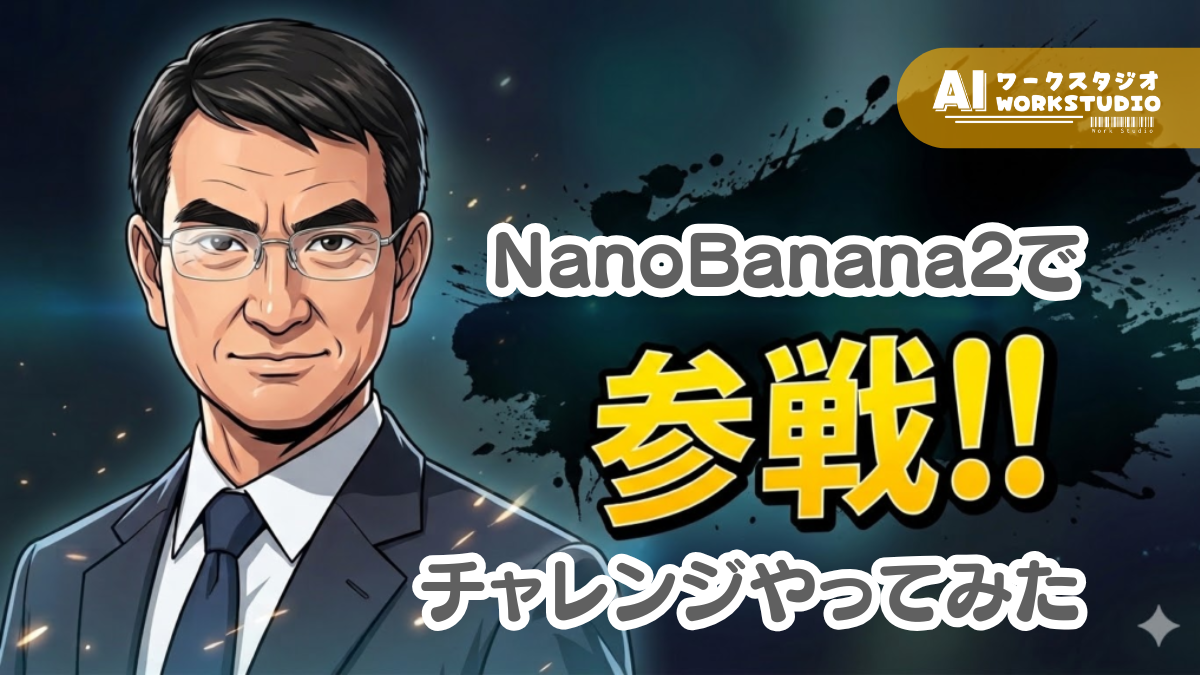
筆者が生成した結果がこちらです!
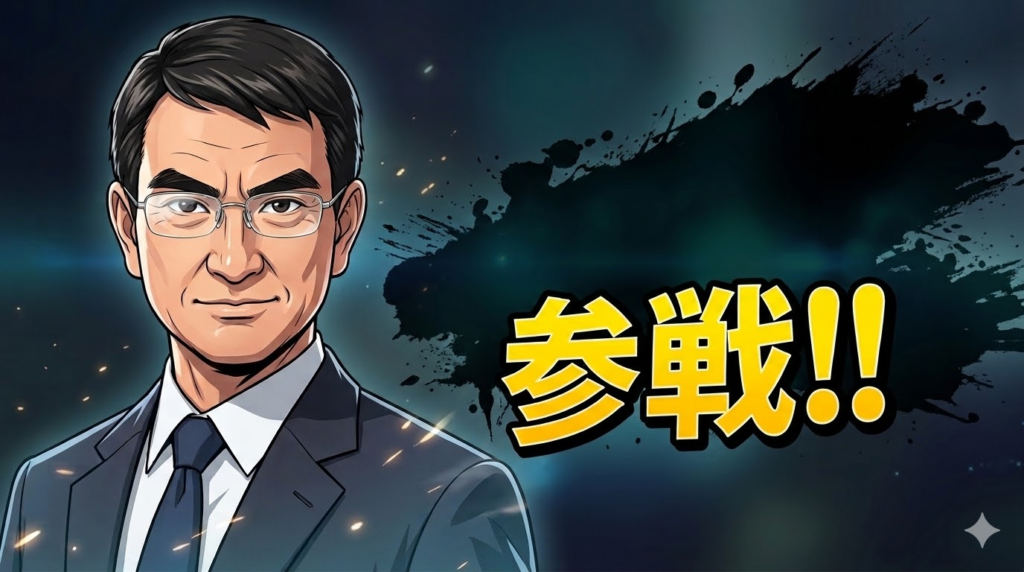
つ、強そうなも~…!

上手く生成できたなもね!プロンプト、大成功なも!
今回はブログに掲載する為、名前を表示しないよう加工しております。
実際に上記のプロンプトで生成した場合、デッカく名前は表示されますのでご安心ください。
まとめ
今回は、ネットミームとして話題の「河野太郎チャレンジ」を題材にしつつ、GeminiのNano Banana 2を使って“参戦風画像”を作る方法をご紹介しました。
実際にやってみると、難しそうに見えて手順はシンプルです。
この記事のプロンプトをそのまま使えば、初めての方でも遊びやすいはず。
気になった方はぜひ、自分なりの演出や背景アレンジも加えながら、Nano Banana 2で河野太郎チャレンジに挑戦してみてください。
合わせて読みたい
ここまで記事を読んでくれてありがとうなも!

下記記事では、AIを性格診断!?「24時間人間になったらどうする?」という質問をAI聞いてみたなも!十人十色なAIの回答…しかし、最後のAIからは衝撃の回答が!?こちらも是非、チェックお願いしますなも~!