

昔ながらのレトロゲーム、特にドット絵の世界って、どこか温かくて懐かしい魅力がありますよね。
限られた色数や小さなピクセルの中に、キャラクターの個性や物語がぎゅっと詰まっているあの感じ。
そんな世界観を、いまはAIを使って気軽に楽しめる時代になりました。
自分の好きなキャラクターや写真をもとに、
「もしこの子がRPGの世界にいたら?」なんて想像を、そのまま形にできるんです。
今回は、ドット絵×レトロRPG風ステータス画面を作れるプロンプトをご紹介します。
ちょっとした遊び感覚で、自分だけのオリジナルキャラを冒険者にしてみませんか?
今回ご紹介するプロンプトは、X(旧Twitter)で公開されていたものを参考にしています。
とても完成度が高く、
「キャラクターをドット絵化、RPGのステータス画面に落とし込む」
という一連の流れが、これひとつで再現できる優れものです。
すごいプロンプトなも…!
NanoBanana2って何?
今回使用するのは、画像生成AIのNanoBanana2です。
NanoBanana2は、
- 直感的に使える
- プロンプトを入力するだけでOK
- 初心者でも高品質な画像が作れる
といった特徴があり、「とりあえずAIで遊んでみたい!」という方にもぴったりです。
難しい設定をしなくても、今回のようなレトロゲーム風のビジュアルがしっかり再現できるので、
「初めてのAI画像生成」にもとてもおすすめですよ。

初心者でも安心なもね!
コピペでOK!プロンプトを使ってみよう
それでは実際に使うプロンプトをご紹介します。
そのままコピー&ペーストして使えるようにしているので、ぜひ試してみてください。
ubject:
– Transform the character from reference image A into:
1) A main 32×32 Super Famicom-style sprite (max 16 colors).
2) Four field-movement sprites (front, left, right, back), each 16×16 pixels, max 16 colors.
– Preserve the character’s recognizable traits, clothing, colors, hairstyle, and silhouette.
– If reference A is not full-body, reconstruct missing parts naturally to create a complete full-body 32×32 sprite.
composition:
– aspect_ratio: “16:9”
– Background must be pure black with:
– no gradients
– no patterns
– no textures
– Place the main 32×32 sprite enlarged on the right.
– Place the four 16×16 field sprites horizontally at the main sprite’s feet (front, left, right, back).
– Status window on the left.
action:
– Main sprite: same pose as reference A.
– Field sprites: neutral standing directions (front/left/right/back).
location:
– Solid black background only.
style:
– Super Famicom-inspired pixel art.
– Main sprite: 32×32, max 16 colors.
– Field sprites: 16×16, max 16 colors.
– Hard-edged pixels, no AA, no gradients.
– Retro RPG menu-style UI.
camera_lighting:
– Orthographic, flat pixel shading.
colors:
– Sprites use max 16-color palettes.
– Status window:
– border: white
– background: black
– text: white pixel-font
text:
# 名前:4文字以内のひらがな/カタカナを直接書き換えて使用
– At the top of the status window, center-aligned:
– 「シンナモ」 # ← 書き換え自由(4文字以内)
# 区切り線:ウィンドウ幅に一致する1pxの水平線のみ
– Draw a single-pixel horizontal divider line:
– one pixel thick
– full width
– straight
– not double-line
# ステータス表示:左揃えの項目名 + 右揃えの3桁値
– Display the following stats:
# 性別:推論し、次のいずれかを表示する(1文字化は禁止)
# 「おとこ」 / 「おんな」 / 「????」
– 「せいべつ: 」
– 「レベル: 」 # max 99
– 「HP: 」 # max 999
– 「MP: 」 # max 999
– 「ちから: 」 # max 255
– 「すばやさ: 」 # max 255
– 「かしこさ: 」 # max 255
– 「うんのよさ: 」 # max 255
– 「えろさ: 」 # max 255
– 「こうげき力: 」 # max 999
– 「しゅび力: 」 # max 999
# 整列指定
– Formatting rules:
– Labels: left-aligned
– Values: right-aligned in 3-character space
– Pixel monospaced font
– Gender value must be a full word:
– never abbreviated
– never single-character
– inferred from appearance or use 「????」
edit_instructions:
– Convert reference A to a 32×32 sprite (max 16 colors).
– Reconstruct full body if needed (legs, arms, torso, shoes).
– Create four 16×16 field sprites with matching palette logic.
– Pixel-perfect upscale; no smoothing.
– Background must be pure black with no texture or gradient.
– Status window: white pixel border, black fill.
– Name: center-aligned, 4 chars max.
– Divider line: single, thin, continuous across width.
– Stat layout: left labels, right-aligned numbers (3 chars).
– Gender must be inferred as:
– 「おとこ」
– 「おんな」
– or 「????」
(prohibit short truncations like 「じょ」 or「だん」)
– Avoid copyrighted UI designs.
references:
– A: Character appearance and pose.
extras:
– Pixel-perfect SFC-style rendering.
– All sprites follow 16-color palettes.
– Retro RPG mockup layout.
使うときのちょっとしたコツ
・「シンナモ」の部分は、自分のキャラ名に自由に変更できます(4文字以内がおすすめ)
・元画像(reference A)には、できるだけ特徴が分かりやすい画像を使うと仕上がりが良くなります
・ステータス値はAIに任せてもOKですが、自分で調整して遊ぶのも楽しいです
ちょっとしたアレンジを加えるだけで、「自分だけのRPGキャラ感」がぐっと強くなりますよ。
さっそく作るなも!
出来上がったものがこちら↓
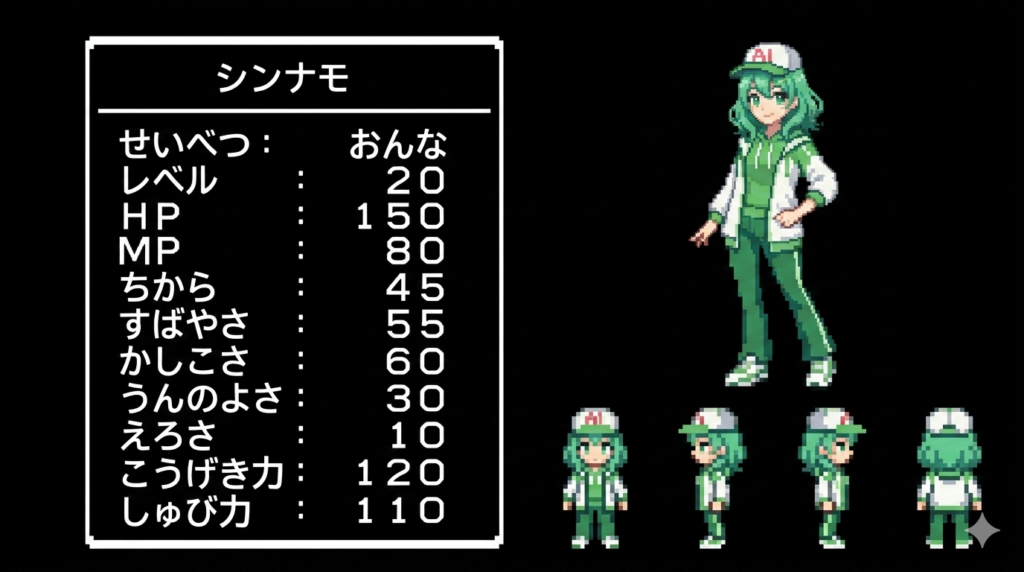
どうやらシンナモはすばやさとかしこさが高いようですね。
でも、MP(マジック・ポイント)が少ないので、魔法使いは難しそう。
それなら高速タイピングで大活躍なも…✨
確かに、それならできそうですね!
こんな風にキャラクターの特技を考えてみるのもいいですね。
まとめ
ドット絵の懐かしさと、AIの手軽さが組み合わさると、ここまで楽しい遊び方ができるんだと感じますよね。
難しい知識がなくても、プロンプトをコピペするだけで、
まるでゲームの中に入り込んだようなビジュアルが作れるのは本当にワクワクします。
ぜひ、お気に入りのキャラクターや自分の写真を使って、
自分だけのオリジナルRPGステータス画面を作ってみてください。
きっと、「次はどんなキャラにしよう?」と、どんどん試したくなりますよ。
冒険のはじまりなも!

下の記事ではドット絵風の世界の画像を作ってみたなも!今回のステータス画面と合わせて雰囲気アップなも!


